Support
Questions, problems, or anything about your data — write to us and a person will answer.
We usually reply within two business days. Telling us your iOS version and what you had just tapped saves a round trip.
Common questions
- Try-On does not appear when I tap Share in a shop
-
iOS hides apps it has not seen used there yet. In the share sheet, scroll
the row of apps to the end and tap More, then find
Try-On. Tap Edit Actions and add it to your favourites so
it stays in the first row. You can also paste the product link straight
into the app instead.
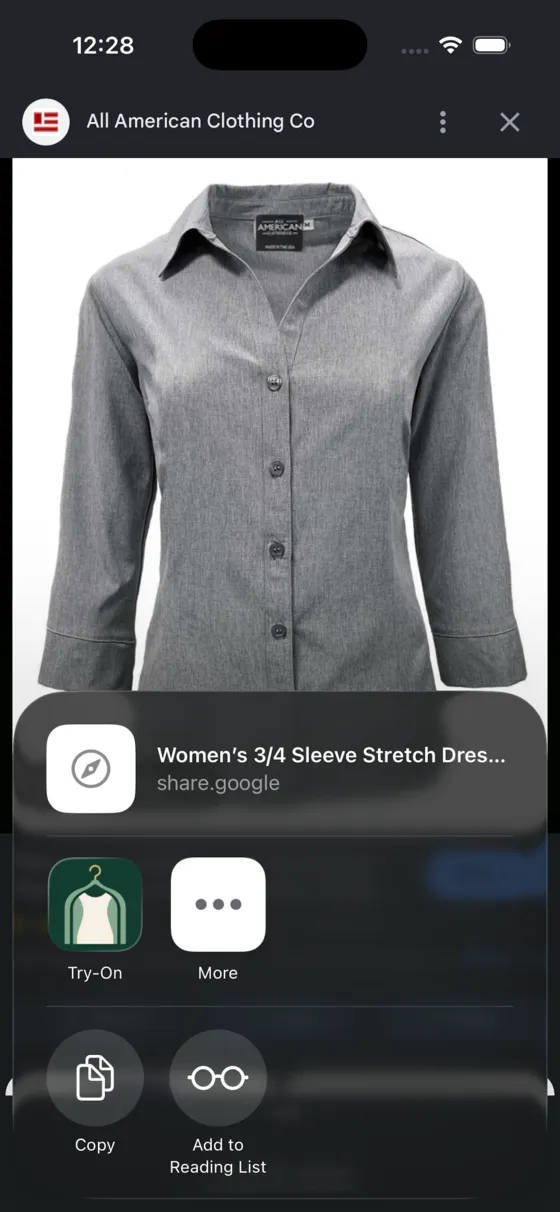
What it looks like once Try-On is in the row. - My photo is rejected
- A try-on needs one clearly visible person with head and feet inside the frame. The guidance is advisory — you can continue with the photo anyway — but results are noticeably better when the whole body fits and the person is facing the camera.
- The garment came out with the shop's background
- Open the look, swipe the garment to the right and choose Cut out, or hold the row and pick Remove background. You can also crop the image or paint out parts you do not want with Edit image.
- How many try-ons do I get?
- 10 are free. Premium raises the limit to 200 per period. The number remaining is shown under the main button.
- I bought Premium and this device does not know it
- Open Settings inside the app and tap Restore purchases. Purchases follow the Apple ID that made them, so use the same one. Billing questions and refunds are handled by Apple, not by us — the app's receipt is in your App Store purchase history.
- A try-on is stuck or never finished
- Generation is not instant, and a slow provider can take a couple of minutes. If it fails, nothing is charged against your remaining try-ons. Retry from the same screen; if it keeps failing, email us the time it happened and we will look it up.
- How do I delete my data?
- Settings inside the app has Delete all data. It removes your photos, your looks, and the anonymous installation identifier from the device, and it is immediate. Deleting the app removes the same material.
Privacy, in short
Your base photo stays on your device. It is not uploaded while you set it up, crop it, or change its background — that runs on the phone.
When you ask for a try-on, the images you picked are sent for processing and deleted afterwards, within 1 hour. There is no account and no advertising identifier. The app identifies your installation with an anonymous value that carries nothing about you and exists only to count try-ons.